Invite through the right path
Set up the production and use the age-aware invitation workflow appropriate to the participant.
FOR SCHOOL DRAMA · YOUTH THEATER · FAMILIES
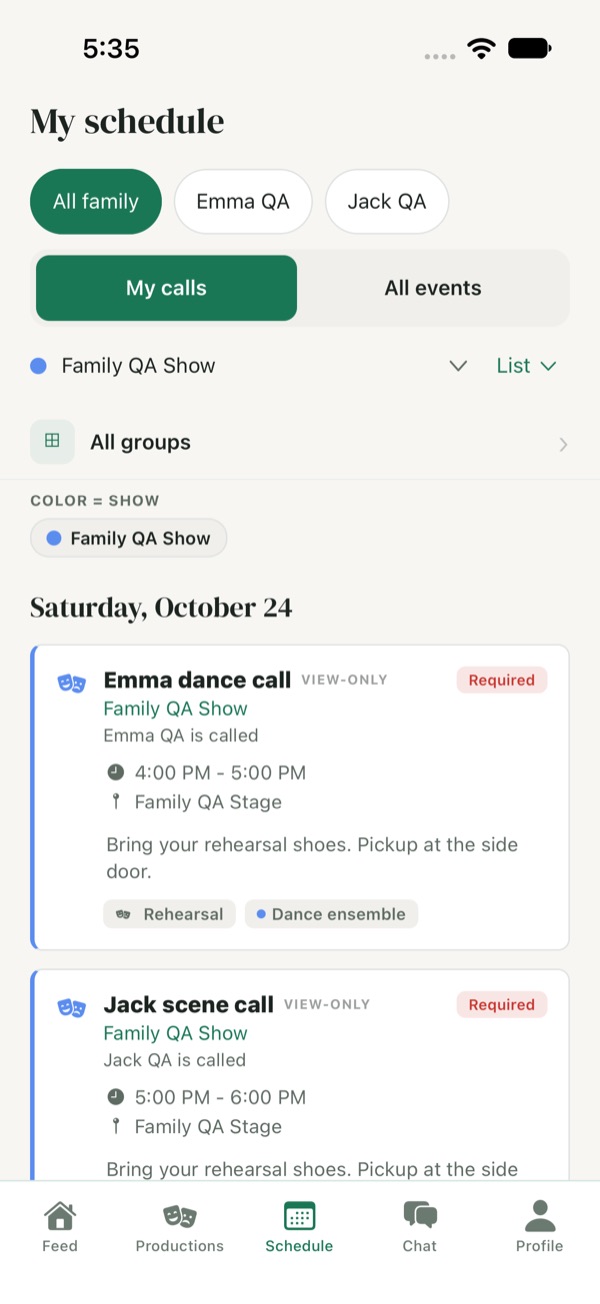
Help young performers find their calls and give approved parents a way to follow the rehearsal plan. Green Room connects production schedules, shared materials, and coordination conversations without making every conversation a family transcript.
One open production free · Unlimited cast & crew · No card required
THE SHORT ANSWER
Green Room provides rehearsal schedules, production communication, and shared materials for school and youth companies. Separately approved parents can follow child schedules and coordination chats. Age-aware invitations and consent-based guardian linking support a separate flagged-message review workflow.
BUILT AROUND THE PRODUCTION
A rehearsal plan is easier to coordinate when performers, production teams, and approved parents have a clear view of their part.
PUT IT INTO PRACTICE
Set up the production and use the age-aware invitation workflow appropriate to the participant.
Complete the required family-access approvals so a parent can follow the child’s schedules, materials, and shared coordination chats.
Publish rehearsal calls and preparation materials. Members remain responsible for their availability submissions and participation responses.
Guardian screening can miss concerns or flag harmless text. It supports your organization’s safeguarding practices; it does not replace them. Only individual eligible direct-message text is sent to a third-party service for safety classification. Flagged text is shared only with the linked guardian, rather than a full conversation.
Read the privacy policy →NO PER-PERSON FEES
Run one school or youth production free, with unlimited cast and crew. Pro adds staff-only rehearsal attendance, conflict-aware scheduling, and tools for managing multiple open productions.
GREEN ROOM FREE
For one open production and its company.
GREEN ROOM PRO
For availability checks and a whole season.
Monthly billing. Cancel anytime. Unlimited people.
A FEW PRACTICAL QUESTIONS
Yes. Green Room Free supports one open production with unlimited cast and crew. Scheduling, calendar sync, announcements, chat, and rehearsal materials are included. No credit card is required.
Yes. With Green Room Pro, the production’s director, stage manager, assistant stage manager, or creator can record attendance from an event. Ordinary students and parents cannot read staff attendance notes.
Yes. After the required approvals, parents can follow child schedules, shared materials, and coordination chats from their own account.
Availability submissions and participation responses remain the member’s responsibility. Approved parent access supports coordination; it does not transfer those actions to the parent.
No. Family access covers shared coordination. A separate consent-based guardian workflow shows flagged messages and review status, rather than a full private-conversation transcript.
Age-aware invitation paths support teens aged 13–17 and a parent communicating on behalf of an under-13 child. Open signup asks adults to confirm they are 18 or older.
Eligible new and edited direct-message text can be screened by a third-party service. Checks may miss concerns or flag harmless text. Flagged content is shared only with a linked guardian. Screening supports, but does not replace, your organization’s safeguarding practices.
Green Room Pro supports multiple open productions and costs $29 per month per organization. It also adds staff attendance tracking, availability submissions, manager views, and rehearsal conflict checks.
THE CALM BEHIND THE CURTAIN
Try Green Room with your next production, on the web, iPhone, iPad, or Android.
Run your first show free →