Select the rehearsal
Open Schedule, choose the event, and open Attendance. Access follows the Pro plan of the organization that owns the production.
REHEARSAL ATTENDANCE · GREEN ROOM PRO
Open a rehearsal from Schedule and record who is present, late, absent, or excused. Green Room Pro keeps the roll call, late minutes, and private staff notes with the event your company already uses.
Pro · $29/month per organization · Unlimited cast & crew
THE SHORT ANSWER
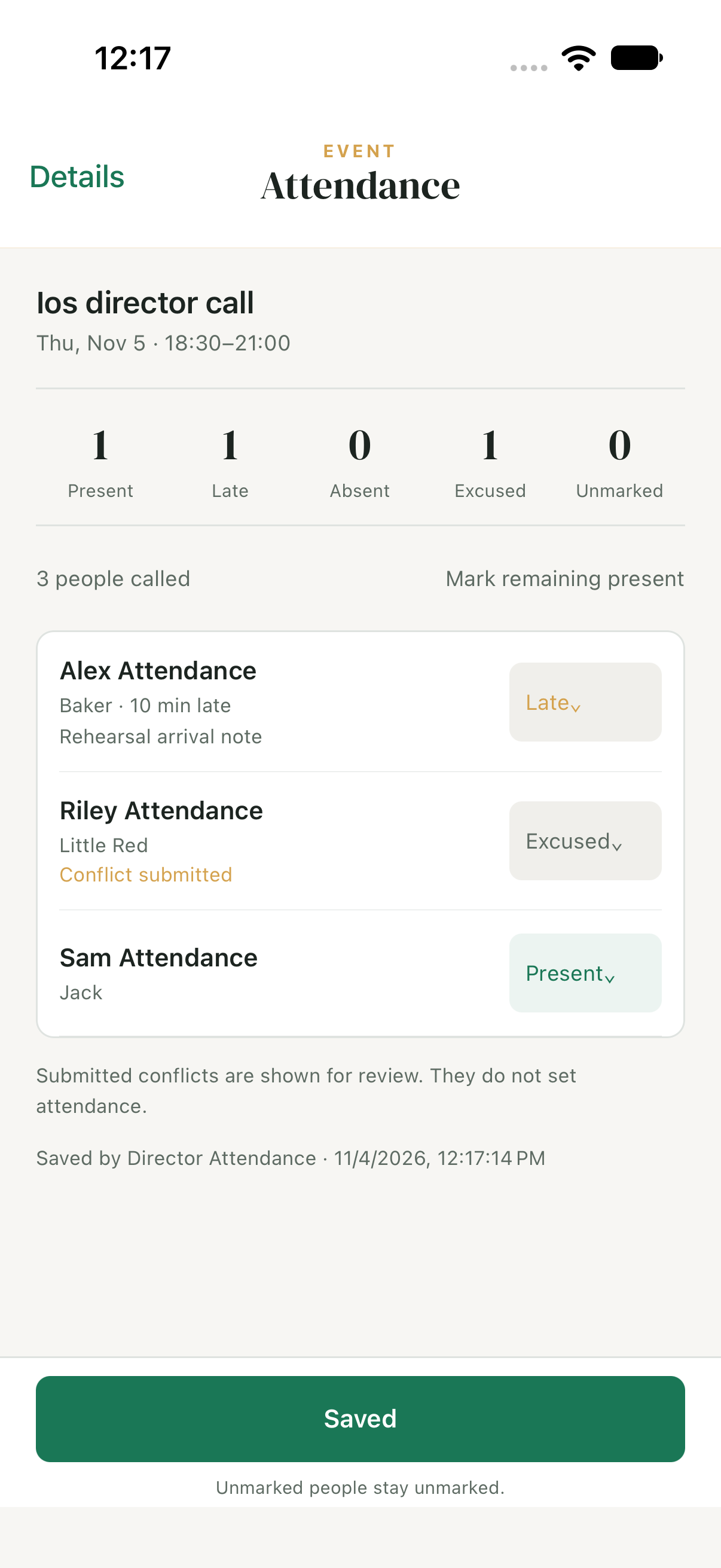
In Green Room Pro, select an event from Schedule and open Attendance. The production’s director, stage manager, assistant stage manager, or creator records attendance for the people called. Choose Present, Late, Absent, Excused, or Unmarked, with late minutes and private staff notes when needed.
BUILT AROUND THE PRODUCTION
Keep attendance in the same production workspace as the schedule, with a clear record of what staff saved.
PUT IT INTO PRACTICE
Open Schedule, choose the event, and open Attendance. Access follows the Pro plan of the organization that owns the production.
Mark each person’s status. Add late minutes or a private staff note, and use Mark remaining present when appropriate.
Save the roll call, leave unmarked people unmarked, and reopen the event to review the saved record.
Attendance is recorded by production staff. Members do not check themselves in, and a submitted scheduling conflict does not automatically excuse someone or set their attendance status.
NO PER-PERSON FEES
Rehearsal attendance tracking is included in Green Room Pro at $29 per month per organization. The production’s organization covers the feature; cast and crew do not need individual paid seats.
GREEN ROOM FREE
For one open production and its company.
GREEN ROOM PRO
For availability checks and a whole season.
Monthly billing. Cancel anytime. Unlimited people.
A FEW PRACTICAL QUESTIONS
Attendance requires Green Room Pro, which costs $29 per month per organization with unlimited cast and crew. Free managers can explore attendance from an event; Free scheduling and calendar sync remain available for one open production.
The production’s director, stage manager, assistant stage manager, and production creator can manage attendance. An organization owner or admin needs production-manager access as well; billing permissions alone do not grant access.
Open Schedule, select a specific event, then open Attendance. The roll call is attached to that event rather than a separate company spreadsheet.
Ordinary cast, crew, and parents cannot open staff attendance or read its private notes. Access is reserved for the production managers who can take attendance.
Yes. Choose Late and enter late minutes, add an optional private note, and save. People you have not marked remain Unmarked. You can return to the saved event later.
No. Submitted conflicts are shown for staff review; they do not set attendance. A manager chooses whether a person is present, late, absent, excused, or still unmarked.
Their saved attendance remains visible as a previously called record. It is kept separately from the current called roster rather than deleted.
No. Production staff record attendance; Green Room does not offer member self check-in for this feature.
Yes. Attendance is available on the web and in updated iOS and Android apps running version 1.9.2. Older native apps need a compatible store update first.
THE CALM BEHIND THE CURTAIN
Try Green Room with your next production, on the web, iPhone, iPad, or Android.
Get Green Room Pro →